
Output Devices Examples
 written by Muneeb Tariq
What is an output device?
Output devices send data from the computer to the user. They help us see, hear, or receive the results of processing. Without output devices, we wouldn’t know what the computer is doing. They make the computer’s work visible, audible, or tangible.
An output device works by receiving data from the computer’s processor or memory and converting it into a form we can understand. For example, when you type a document, the monitor shows your work. When you print it, the printer gives a physical copy. When you play music, speakers turn the data into sound.
The difference between input and output is simple. Input sends data into the computer. Output sends results out to the user. You use input to give commands and output to get feedback.
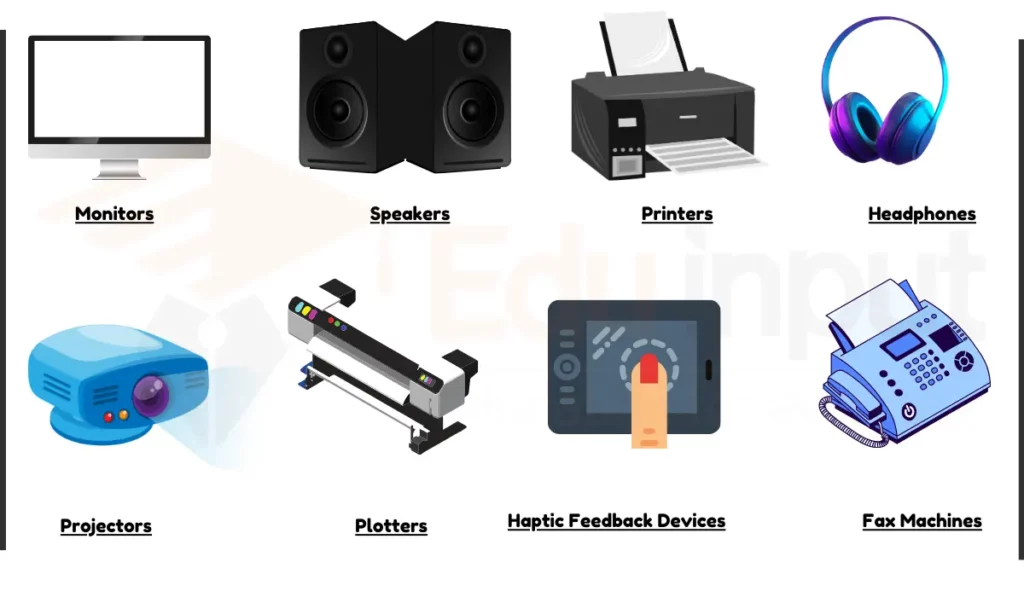
The most common output devices are monitors, printers, speakers, and projectors. They help in daily computing tasks. Some output devices are less common but still important. For instance, braille displays help visually impaired users read text. Thermal printers print receipts. E-ink displays show content on e-readers.
In simple words, output devices of a computer help users see, hear, or obtain the results of processing.
Explore a complete list of computer icons and their functions.
20 Examples of Output Devices of Computer
Examples of Output devices include:
Visual Output Devices
1. Monitors
Monitors display digital content using LCD, LED, or OLED panels that convert signals from the graphics card into visuals through a matrix of pixels and backlights. I is useful for working on documents, browsing the web, gaming, video editing, and displaying diagnostic data in hospitals or design visuals in media labs, they’re found in homes, offices, schools, and clinics. They connect via HDMI, DisplayPort, USB-C, and sometimes VGA.
Types of monitors include:
- LCD (Liquid Crystal Display) monitors
- LED (Light Emitting Diode) monitors
- OLED (Organic Light Emitting Diode)
2. Printers
Projectors use light and lens systems (DLP, LCD, or LCoS) to project visual data onto large surfaces. They are useful in classrooms for interactive teaching, in offices for presentations, and in home theaters for media viewing. Common inputs include HDMI, VGA, and Wi-Fi. Performance depends on brightness (measured in lumens), resolution (HD to 4K), throw ratio, and contrast ratio for visibility in various lighting conditions.
Types of printers include:
- Inkjet printers for color printing
- Laser printers for fast monochrome printing
- Thermal printers for receipts and barcode labels
3. Digital Signage Displays
These large-format output devices use LED or LCD screens to deliver rotating or real-time information, controlled remotely by a media server. Useful for public announcements in schools, hospital directions, retail advertising, and transport schedule displays, they often support HDMI, Ethernet, or wireless content syncing. Brightness (in nits), screen size, durability, and remote management capabilities determine their effectiveness in public spaces.
4. Digital Photo Frames
Digital photo frames display slideshows of stored images using internal storage, SD cards, USB input, or cloud syncing. These are useful for personal photo displays at home, marketing visuals in stores, or art displays in galleries. They connect via USB, Wi-Fi, or SD card and vary in screen resolution, size, file format support, and slideshow features like timing and transitions.
5. Interactive Whiteboards
These output devices combine display with touch or stylus input, rendering visual data while allowing users to interact directly. They are useful in schools for collaborative lessons, corporate meeting rooms for brainstorming, and training centers for diagram-based instruction. They connect via USB, HDMI, or wireless, and important specs include touch-point accuracy, latency, software integration, and screen size.
6. Smart Glasses (e.g., Epson Moverio)
Smart glasses overlay computer-generated images and data into the user’s field of vision using AR technology. Useful for hands-free logistics, remote medical assistance, industrial inspection, and real-time training, they connect via Bluetooth or Wi-Fi and depend on factors like field of view, display clarity, battery life, and weight.
7. Virtual Reality (VR) Headsets
VR headsets immerse users in simulated 3D environments using stereoscopic displays and motion tracking. These are useful in medical simulations, architectural walkthroughs, education, therapy, and gaming. They connect through USB, HDMI, or proprietary interfaces and perform best with high resolution per eye, low latency, wide field of view, and high refresh rates for realism and comfort.
8. LED & LCD Billboards
Large-scale LED and LCD billboards display full-color videos, text, or images for public communication. They are useful in stadiums, highways, transport stations, and storefronts for high-visibility advertising or alerts. These displays connect via HDMI, Ethernet, or wireless controllers, and critical specs include outdoor brightness (often 1000+ nits), pixel pitch, screen size, and weather resistance.
Audio Output Devices
9. Speakers
Speakers produce sound by converting digital audio signals into vibrations through magnets and diaphragms. They are useful for music playback, media consumption, classroom audio delivery, and audio alerts in control rooms. They connect via 3.5mm jacks, USB, Bluetooth, or Wi-Fi, and their performance depends on frequency response, sound clarity, wattage, and stereo or surround sound configuration.
10. Headphones
Headphones deliver private audio output by sending digital or analog signals through drivers positioned close to the ears. Useful for focused listening in classrooms, travel, customer support, and media editing environments, they can connect through wired jacks, USB ports, or wirelessly via Bluetooth. Important specs include noise cancellation, comfort, impedance, and audio latency for real-time communication.
Types include:
- Over-ear headphones for maximum sound isolation
- On-ear headphones for compact design
- In-ear headphones (earbuds) for portability
11. Voice Output Systems
These systems use speech synthesis (text-to-speech) to vocalize on-screen information for accessibility or hands-free operation. They are useful for the visually impaired, in automated kiosks, language tools, and screen-reading software. They rely on internal sound cards or external speakers and are rated for voice naturalness, language variety, and adjustable speech speed and tone.
Tactile & Physical Output Devices
12. Printers
Printers convert digital files into physical formats using ink (inkjet), toner (laser), or heat (thermal). They are useful for printing assignments in schools, reports in offices, photos at home, prescriptions in hospitals, and tickets in stores. They connect via USB, Wi-Fi, or Ethernet, and their output quality depends on DPI (dots per inch), pages per minute (PPM), color handling, and duplex printing.
13. 3D Printers
3D printers use additive manufacturing (FDM, SLA, or resin-based systems) to produce physical objects layer-by-layer from digital models. They are useful for prototyping in engineering, creating prosthetics in medicine, designing models in art and education, and even in space missions. These devices connect via USB, SD card, or Wi-Fi and are defined by build volume, resolution (layer height), supported materials, and print speed.
14. Plotters
Plotters draw detailed line-based graphics on large media using pens or inkjets, guided by vector data from CAD programs. They are useful for architectural blueprints, engineering schematics, and map design. Plotters connect via USB, LAN, or parallel ports, and relevant specs include plotting resolution, maximum paper size, speed, and color channel support.
15. Braille Embossers
These emboss raised Braille dots onto paper by mechanically pressing from a digital source.
They are useful for creating accessible books, menus, and signage for the blind in libraries, schools, and public spaces. They connect via USB, serial ports, or network connections and are measured by embossing speed (characters per second), dot sharpness, and paper feed handling.
16. Haptic Feedback Devices
These output devices generate tactile sensations using motors or actuators to simulate texture, pressure, or vibration. They are useful in gaming controllers, mobile devices, surgical simulators, and accessibility tech to convey digital feedback physically. They typically connect via USB or Bluetooth and are evaluated based on responsiveness, range of feedback types, and synchronization with visual/audio cues.
17. CNC Machines
CNC (Computer Numerical Control) machines shape, drill, or cut materials based on programmed designs, translating digital models into physical forms. Useful in industrial manufacturing, custom part creation, robotics, and STEM education labs, they require USB or Ethernet interfaces and key specs include axis control (3/5-axis), precision, spindle speed, and compatible toolsets.
18. Thermal Printers
These printers use heat-sensitive paper and thermal heads to create text or images without ink. They are useful for generating receipts, tickets, barcode labels, and shipping information in retail, logistics, and healthcare. They connect via USB, serial ports, or LAN, and are evaluated based on print speed, paper width, resolution, and durability.
19. Barcode Printers
Barcode printers produce machine-readable tags and labels for product tracking, inventory, and identification. Useful in hospitals for patient wristbands, in warehouses for stock labels, and in retail for price tags, they connect via USB or Ethernet, and key specs include barcode resolution, media compatibility, print width, and speed.
Specialized & System Output Devices
20. LED Status Indicators
These small, embedded lights provide real-time signals about system status like power, errors, or activity using specific color and blink patterns. They are useful for device diagnostics, alerts, and maintenance feedback in routers, computers, and appliances. They are typically integrated internally or connected via USB headers and rated for brightness, voltage compatibility, and signal accuracy.
21. Fax Machines
Fax machines scan and transmit printed documents through analog phone lines, then print received data on paper. Still useful in legal and healthcare fields where digital signatures aren’t accepted, they connect via landline ports and are defined by transmission speed (baud rate), page capacity, and print clarity.
22. Air Traffic Control Displays
These specialized monitors display real-time radar, aircraft data, and weather information to controllers using high-resolution graphics and zero-lag refresh. They are crucial for coordinating flights and ensuring safety. They connect via secured aviation networks, and key specs include refresh rate, resolution, fail-safe integration, and anti-glare viewing.
FAQs
What is output vs input?
Input: Data sent to a computer (e.g., typing on a keyboard).
Output: Data sent from a computer (e.g., text displayed on a monitor).
Is light an input or output?
Light can be both input and output, depending on its role:
Input: When a device senses light, like in a camera or light sensor.
Output: When a device emits light, like in a monitor, LED, or flashlight.
Is CD an input device?
No, a CD (Compact Disc) is not an input device.
What are 30 examples of output devices?
Here are 30 examples of output devices:
Monitors
Printers
Speakers
Headphones
Projectors
Plotters
3D Printers
Braille Embossers
Smart Glasses
LED Displays
Fax Machines
Digital Signage Displays
Interactive Whiteboards
Barcode Printers
CNC Machines
Thermal Printers
LED Status Indicators
Air Traffic Control Displays
Digital Photo Frames
Haptic Feedback Devices
Virtual Reality Headsets
Epson Smart Glasses
Projection Screens
Digital Billboards
Optical Mark Recognition (OMR) Scanners
Voice Output Devices
Touchscreen Displays
3D Holographic Displays
Flatbed Scanners
Electronic Paper Displays (EPD)
What is output devices of computer list?
Here’s a list of common output devices:
Monitors
Printers
Speakers
Headphones
Projectors
Plotters
3D Printers
What Are the Output Devices of a Computer?
Output devices of a computer are devices that receive processed data from the computer and deliver it in a usable form, like monitors, printers, speakers, and headphones.


Leave a Reply