What is Hierarchical DBMS – Components, Working
 written by Muneeb Tariq
A Hierarchical DBMS is a type of Database Management System that organizes data in a tree-like structure using parent-child relationships. One parent can have many children, but each child can have only one parent. IBM IMS, released in 1968, is the most well-known hierarchical DBMS and is still used in banks and hospitals in 2026.
Think about the folders on your computer. You have a main drive. Inside it, you have folders. Inside each folder, you have more folders or files. This arrangement follows a clear top-to-bottom order. That is exactly how a Hierarchical Database Management System (DBMS) organizes data.
Definition of Hierarchical DBMS
A hierarchical DBMS stores data in a tree structure. Each record (called a node) connects to one parent above it and can have many children below it. This one-to-many (1:N) relationship is the defining rule of the hierarchical model.
Core rule of Hierarchical DBMS:
- One parent can have many children (one-to-many relationship)
- Each child has only one parent (no exceptions)
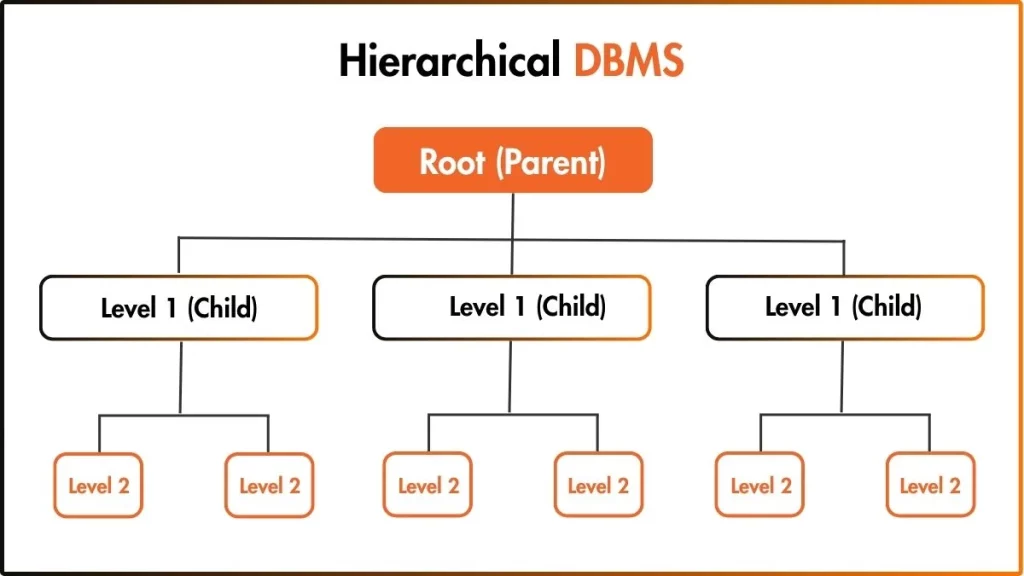
What are Components of Hierarchical DBMS?
The key components of a hierarchical DBMS are: root node (topmost record with no parent), parent node (record with children below it), child node (record with exactly one parent), leaf node (bottommost record with no children), branches (links between nodes), levels (depth of a node), segments (data units), and the one-to-many (1:N) relationship rule.
Here are the key components of a hierarchical DBMS:
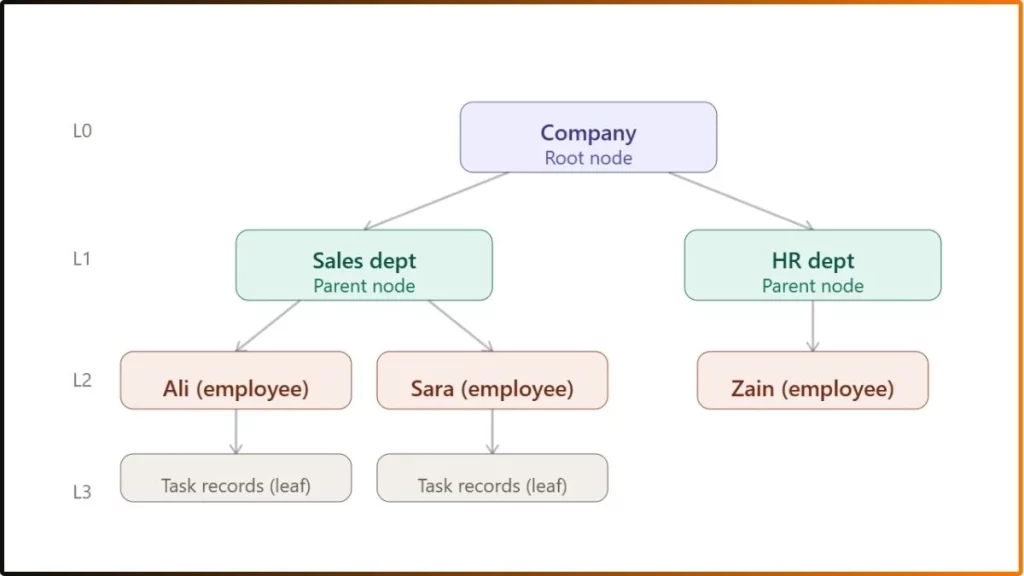
- Root Node: The root node is the topmost record in the hierarchy. It has no parent. Every other record in the database connects back to the root node through some path. The root node is the starting point for all data access. For example, in a company database, the company itself is the root node.
- Parent Node: A parent node is any record that has one or more records connected below it. A parent can have multiple children. For example, A department like “Sales” is a parent node to all employees in that department.
- Child Node: A child node is a record connected to a parent node above it. The most important rule: every child node has exactly one parent. A child cannot have two parents in a hierarchical model. For example, an employee named “Ali” is a child node of the “Sales” department.
- Leaf Node: A leaf node is a record at the bottom of the tree. It has no children below it. Leaf nodes are the endpoints of the hierarchy. For example, individual task records assigned to an employee are leaf nodes.
- Sibling Node: Sibling nodes are records that share the same parent. They exist at the same level in the tree but do not connect to each other. Only to their common parent. For example, “Sales,” “Marketing,” and “HR” are siblings if they all belong to the same company.
- Segment (Record): In hierarchical DBMS terminology, each node stores a segment (also called a record). A segment contains multiple fields, like name, ID, and date. In IBM IMS, data units are specifically called segments.
How Does a Hierarchical DBMS Work?
A hierarchical DBMS works by storing data in a tree structure using pointer-based links. To retrieve data, the system always starts at the root node and follows a predefined path downward to the target record. Inserting data requires the parent to exist first. Deleting a parent automatically deletes all its children (cascading delete).
Here is the step-by-step working process of a hierarchical DBMS:
Step 1 – Data is organized into a tree structure
Before anything happens, the DBMS builds the structure. Data is not stored in flat tables. It is stored in records (segments) arranged in a strict top-to-bottom tree. The system defines this tree shape in advance through a schema. It is a blueprint that says which record types exist, which is the parent, and which are the children.
Step 2 – Data insertion follows the parent-first rule
When you want to add a new record, the system checks if the parent record already exists.
- If the parent exists, the child record is inserted below it.
- If the parent does not exist, the insertion is rejected.
Example: You want to add a new employee “Hamza” to the Sales department.
The system checks that “Sales Dept” already exists in the tree. It creates a new child record for “Hamza” and attaches a pointer from “Sales Dept” to “Hamza.” Then Hamza’s record now sits at Level 2, directly below the Sales dept.
Step 3 – Data retrieval
This is the most important operation to understand. The hierarchical DBMS retrieves data by starting at the root and moving downward through levels. This is called depth-first traversal.
There is only one path to any record. The system uses pointers to follow the path directly.
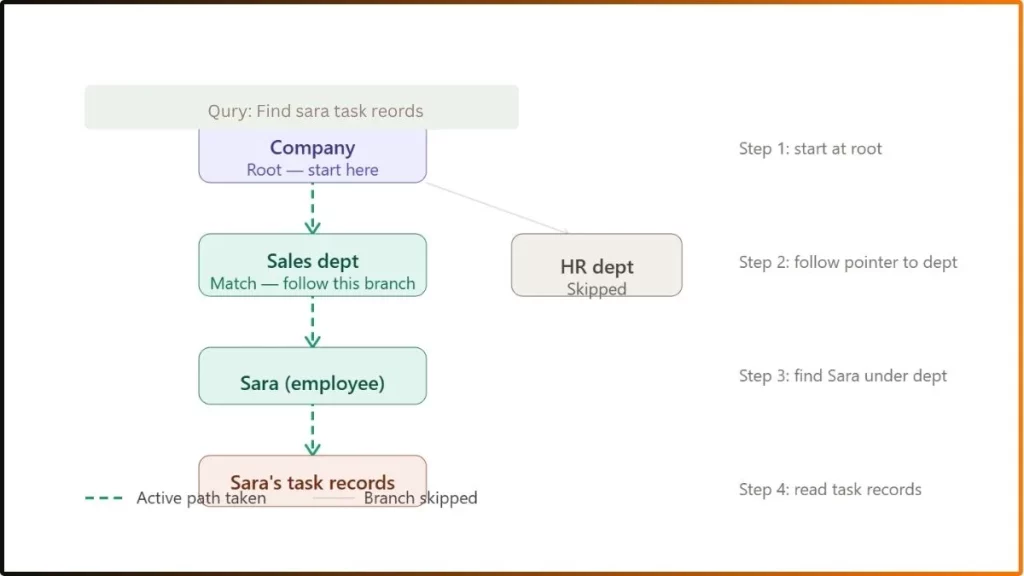
The system always takes this exact route. It cannot take shortcuts or jump levels. This is why retrieval is fast for known queries but limited for complex, unpredictable ones.
Step 4 – Data deletion triggers a cascading delete
Deletion in a hierarchical DBMS follows a strict and powerful rule: deleting a parent automatically deletes all its children. This is called a cascading delete.
For Example:
You decide to delete the “Sales Dept” record.
- The system first finds all employee records under Sales dept (Ali, Sara).
- It then finds all task records below Ali and Sara.
- It deletes the task records first (bottom of the tree), then the employee records, then the department record.
- The deletion moves upward from the leaf nodes to the parent being removed.
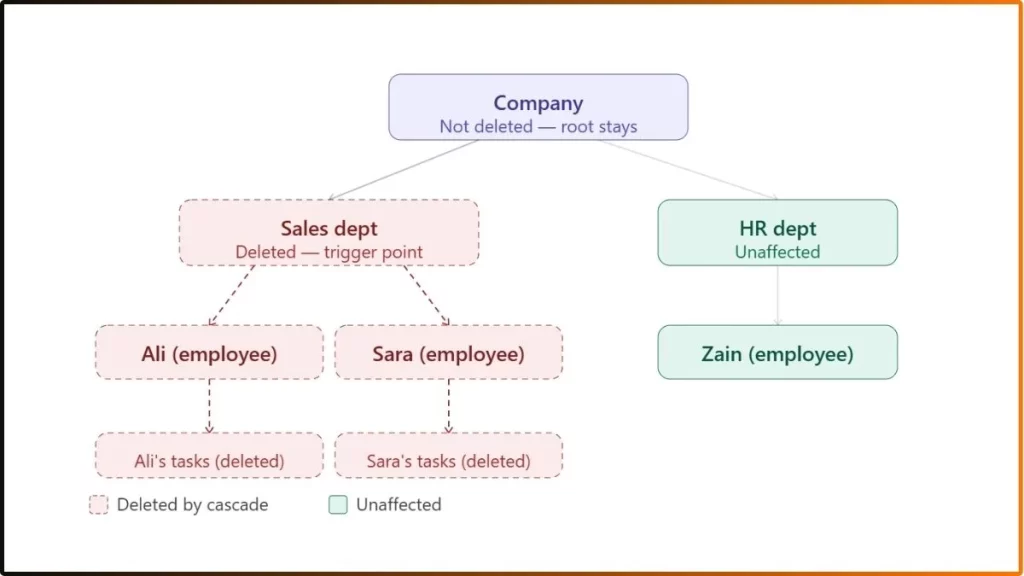
This is a powerful feature, but also a risk. If a database administrator deletes a parent record by mistake, all child data is permanently gone. This is why hierarchical databases require careful administration and regular backups.
Step 5 – System returns the result
After traversal and any operations are complete, the DBMS returns the result to the requesting application. Because the path was predefined using direct memory pointers.
This is exactly why IBM IMS can process over 100,000 transactions per second on a single system. The retrieval path never needs to be calculated. The system already knows exactly where every record lives.
Advantages of Hierarchical DBMS
Here are some advantages of Hierarchical DBMS:
- Fast data retrieval through predefined pointer-based paths, no table joins needed
- Simple, intuitive tree structure that mirrors real-world relationships
- High performance for high-volume transactions (IBM IMS handles 100,000+ per second)
- Built-in security and access control apply at each level of the tree
- Works well with sequential storage media like magnetic tapes
Disadvantages of Hierarchical DBMS
Here are some drawbacks of hierarchical DBMS:
- No support for many-to-many (M:N) relationships — each child can have only one parent
- Data redundancy — the same record must be stored multiple times if it belongs to more than one branch
- Rigid structure — reorganizing or restructuring the tree requires significant effort
- Deletion anomalies — deleting a parent removes all child records, even if still needed
- Single access path — data can only be retrieved top-down through one predefined route
- Insertion constraints — a child record cannot be added until its parent exists
Frequently Asked Questions (FAQ)
What is the difference between hierarchical DBMS and relational DBMS?
A hierarchical DBMS organizes data in a tree structure with parent-child relationships and supports only one-to-many (1:N) connections. A relational DBMS organizes data in tables with rows and columns, supports many-to-many (M:N) relationships, and uses SQL for flexible queries.
What are examples of hierarchical databases?
The most common example of hierarchical databases is IBM IMS (Information Management System). Other real-world implementations include the Windows Registry, DNS (Domain Name System), XML file structures, LDAP directory services, and file systems on all major operating systems.
Which companies still use hierarchical DBMS?
Major banks (including the top five U.S. banks), insurance companies, hospitals, telecommunications companies, and government agencies continue to use IBM IMS. As of 2026, IMS remains active in over 95% of Fortune 1000 companies.