
Introduction Of Computer Science
Computer science involves the study of computation, automation, and information and spans theoretical disciplines to practical disciplines such as the design and implementation of hardware and software.
Computer science is an interdisciplinary branch of study. It combines ideas from mathematics, physics, biology, electrical engineering, and philosophy. It has been said that a computer scientist is someone who is capable of building a computer.
The traditional study of computer architecture, programming languages, and software development are some of the major subfields of computer science. Computational science, the use of algorithmic techniques for modeling scientific data, graphics and visualization, human-computer interaction, databases and information systems, networks, and the social and professional issues that are unique to the practice of computer science are included.
Some of these subfields are related to other modern fields such as bioinformatics and computational chemistry. A tendency among computer scientists to recognize and act upon their field’s many interdisciplinary connections is what leads to these overlaps.
History Of Computer Science
Although first proposed in 1956, the term “Computer Science” appears in a 1959 article in Communications of the ACM, in which Louis Fein argues for the creation of a Graduate School in Computer Sciences.
A large amount of computer science does not involve the study of computers at all. The term computing science has been used by some departments of major universities to emphasize that difference.
The term datalogy was suggested by a scientist to reflect the fact that the scientific discipline revolves around data and data treatment, while not necessarily involving computers.
The Department of Datalogy at the University of Copenhagen was the first scientific institution to use the term, with Peter Naur being the first professor in Datalogy. Most of the time, the term is used in Nordic countries. Data science is an alternative term proposed by Naur and is now used for a multi-disciplinary field of data analysis, including statistics and databases.
Father of Computer
Charles Babbage was a renowned mathematician in the 1800s who is considered by many to be the father of computing. This is largely due to his concept of the Analytical Engine in 1837, which was a machine that could be programmed to carry out complex calculations. It contained an ALU (arithmetic logic unit), basic flow control, and integrated memory – all hailed as major breakthroughs for computing at the time.
Unfortunately, Babbage was never able to fully fund the construction of his machine and it was only ever completed after his death by others who took interest in his work.
The word computing came into existence around 1910-1911. At that time a few people were working with mechanical computers. They were using devices like Jacquard Loom, etc. They were using them for calculating purposes. But they could not predict what would happen in future.
So they started calling these devices “computers”. These days we use many words instead of the word “computer”. We call it “smartphone”, “laptop”, “tablet”, etc. And we use those things everywhere. We even eat food by using our smartphone.
Scope Of Computer Science
As per the current trends, the career in computer science has gained a tremendous pace for years and today, the field is highly demanded.
There are a number of courses available in the market and if you want to start the course for getting a good job, then it is suggested to choose the right course for yourself.
There are different types, of courses, available for computer science education and one of the most important things that you have to keep in mind while choosing the best course is whether the course is right for you or not.
We all know that the role of a computer scientist is one of the most challenging jobs and it requires different skills and abilities. If you are looking for a well-paid job, then choosing the best course is of great importance for you.
In today’s era, you can make your career as a computer scientist with the help of the right training. To choose the right course for yourself, you must consider several things that are given below.
Knowledge of programming languages
The first thing that you need to consider is the language that you are going to learn. Most of companies require candidates who are fluent in programming languages, so it is advised to learn at least two programming languages. If you are a beginner, then it is suggested to start with Python, Java, C++, and JavaScript. It will help you to improve your skills and get trained in the latest technologies.
Knowledge of Computer architecture
If you want to make your career in this field, then you must keep in mind how much you have knowledge of Computer Architecture. If you are a novice, then you need to learn everything from scratch. If you already have knowledge of the computer architecture, then it will make your career easier and you will be able to get higher grades.
Advanced problem solving skills
If you want to become a successful computer scientist, then it is essential to possess advanced problem solving skills. This is one of the most important aspects that can differentiate you from other candidates. If you can solve an average problem, then you will not be considered a candidate.
Programming projects
You can make your career as a computer scientist if you can make your own projects. You will be required to write codes for different purposes and projects. In order to make your project successful, it is recommended to make it innovative.
Branches of computer science
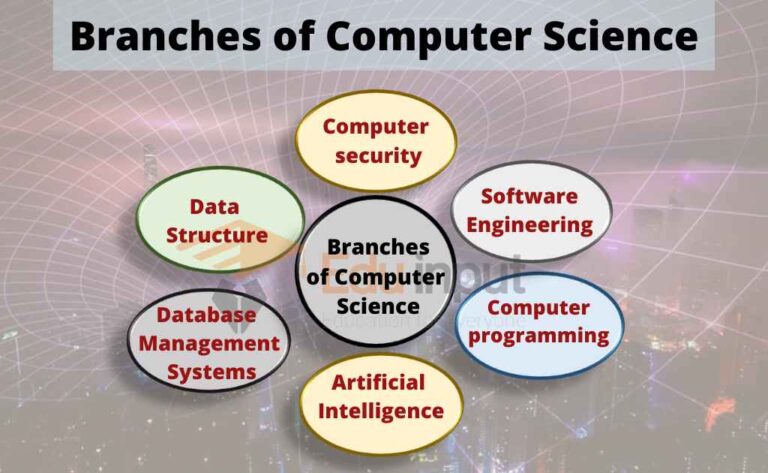
Computer Science is the study of the design of computers and computer systems. The study of computers and computing is referred to as computer science. The analysis of data structures, computer and network design, modeling data and information processes, and artificial intelligence are included.
A lot of mathematics, statistics, and probability are used in computer science. There is a lot of experimentation used to test hypotheses.
Artificial intelligence, computer systems and networks, information security, database systems, and human-computer interaction are some of the main areas of study of artificial intelligence. There are many different branches that artificial intelligence covers, from theoretical computer science to the applications of computer technology in the real world.
Software engineering
Software engineering is the branch of computer science that deals with the design, development, testing and maintenance of software applications.
Software developers write code to create applications. Software developers use programming languages and design software solutions for users.
Artificial Intelligence
Artificial intelligence is a branch of computer science that deals with techniques that mimic or even recreate the capabilities of the human mind. A new type of intelligent machine that can respond in the same way as humans is created by Artificial Intelligence. Artificial intelligence can find human wisdom. Humans will eventually be surpassed by artificial intelligence.
Programming languages
Programming languages are used by most other disciplines in order to function in computer science. The programmers translate the programming language into the computer’s language of choice. The study of programming languages and logic is focused on designing the languages and analyzing them. This study shows how to use the smallest amount of code in the languages to write complex programs.
Computer security
There is a discipline of computer science that deals with protecting information on computers. One of the things that can be included in this is the creation of software that is invulnerable to theft, destruction, fraud, or access by an unauthorized user. The part of computer security that protects the data is called computer security. It is a practice to translate information from its natural state into a hard- to-decipher pattern using a set of rule-based computations as well as using a set of algorithms to decode data.
Database Management Systems
Database Management Systems are the most used and popular area of computer science. People use this application to store data and information.
Topic Wise Computer Articles
Difference Between in Computer
Difference Between The Internet And World Wide Web (WWW)
Difference Between Input Devices And Output Devices
Difference Between Supercomputer And Mainframe Computer
Difference Between LCD and CRT
Difference Between RAM And ROM
Difference between Impact printer and Non-impact printer
Difference between low-level language and high-level language
Difference Between Spreadsheet And Word Processor
Difference Between DOS And Windows
Difference Between Source Code and Object Code
Difference Between Application and System Software
Basics of information technology
Mini Computers-Types of Mini Computers
Desktop Computer–Types of Desktop Computer
Supercomputers-Features, Advantages and Disadvantages of supercomputer
Optical Readers-OCR, OMR, MICR, And Barcode Reader
What is Computer Motherboard?-Types and History of Motherboard
What is Scanner in Computer?- Types of the scanner
What is SSD (Solid State Drive)?
What are Storage Devices?-Different Storage Devices
What is a Computer Mouse
The Computer System-SDLS and its Phases
What is Presentation Software?
History of Computer | Early Calculating Devices
What is Printer? | Different Types of Printers
Data and Information in Computer
5 Interesting Facts About Computers History
Software- Definition, types of Software
Abbreviation for Computer Science | IT Abbreviation
Generations of Computers- First to Fifth Generation of Computer
Information Network
Computer Network – Types of Computer Network
Computer Network and Network Topologies
Local Area Network(LAN)-Advantages and Disadvantages of LAN
What is a WAN Network? – Advantages and Disadvantages of Wide Area Network
Network Devices – Types of Devices of Computer Network
What is an Integrated Circuit?-Parts of ICs
What is Internet? – History of the Internet, Addressing Schemes
What are the Advantages of the Internet?
What are the Disadvantages of the Internet?
What is World Wide Web? – Components of World Wide Web
What is TCP/IP-History of TCP/IP, And How does TCP-IP work?
Essential Tips for Choosing Best Computer Network Service Provider
OSI Model-7 Layers of OSI Model
Physical Layer of OSI Model – Function of Physical Layer
Application Layer in OSI Model | Application Layer Protocols
Transport Layer of OSI Model | Session Layer of OSI Model
Computer Architecture
What is CPU?–Components of CPU
Expansion Bus-Types of Expansion Buses
Von Neumann Architecture-Fetch, Decode, And Execute Cycle of CPU
I/O Interface (Interrupt and DMA Mode)
5 Factors Effecting the Processing Speed
What is Cache Memory?-Levels of Cache Memory
What are Computer Ports?-Types of Computer Ports
What are CPU Registers?-Types of CPU Registers
Memory Units of Computer-Bit, Byte, Nibble, Word
Windows Operating System
Fundamentals of the Internet
What is Internet? – History of the Internet, Addressing Schemes
What are the Disadvantages of the Internet?
What are the Advantages of the Internet?
What is E-Commerce? – Roll of E-Commerce in Daily Life
Internet Service Provider(ISP)-Different Types of ISP
Search Engine – History of Search Engine
What is Web Browser – History of Web Browsers
Internet Services – Difference between Intranet and Extranet
Basics of database
What are Database-Types of Database
Components of Database | Advantages of DBMS over the File system
Database Management System-Advantages and Disadvantages of DBMS
Database Languages-Data Definition Language (DDL), Data Manipulation Language (DML)
What are Attributes in DBMS?-Types of Attributes in DBMS
Data Dictionary in DBMS–Types of Data Dictionary
Distributed Database Management System (DDBMS)–Advantages and Disadvantages
Distributed Database Design–Factors of DDBMS
Staged Database Design Approach-Steps of Database Design Approach
Degree of Relationship in DBMS-Unary, Binary, Ternary, and N-ary (n degree) Relationship
Introduction to C/C++
What are Keys in DBSM?–Types of Keys
History of C Language – Advantages and Disadvantages of C Language
Programming Languages | Language processor
High-Level Programming Language-Popular High-level languages
Debugging in Turbo C++ | Different types of Error in C/ C++
Structured Programming Technique-Advantages and Disadvantages
Problem Solving Techniques in Computer Science
Introduction to Flowchart | Difference between Flowchart and Algorithm
Variable in C Language–Variable Declaration, And Variable Initialization
What Are Constants In C/C++?-Literal Constant, Symbolic Constant
Assignment Operators in C++ | Compound Assignment Operators in C++
Increment and Decrement Operators in C++
Relational Operators in C++ | Relational Expressions
Logical Operators in C++ | Different Logical Operators
Arithmetic Operator in C++
Operators in C++ | Unary and Binary operators
C++ Data Types-int, float, char, double, bool
Functions in C/C++ | Advantages of Functions in C/C++
What are Escape Sequences in C Language?
Applications and uses of computer
Uses Of Computers For Office Automation
Uses of Computers in Communication
Use of Computers in the Field of Chemistry
Applications of Computer in the Agriculture
Use of Computer in the Defense Department
Use of Computers in Education Field
Use of Computers in Education Field
Applications Of Computer In Different Fields
Computers are used in different fields for different purposes.
In Education Department
Computers play an important role in the education sector. They are used for online classes, examinations, e-books, and tutoring. They help to increase the use of audio-visual aids in education.
In Banks
Computers play a vital role in the banking sector as they store customer information and are used to conduct various transactions such as money withdrawals and deposits via ATMs. By extensively using computers, banks have been able to reduce manual errors and expenses significantly.
At Homes
There are many different uses for computers at home. Some people use them to listen to music, watch movies, or even keep track of their finances. Others use them for work or school purposes.
In Medical Field
Computers play an important role in the medical field. They are used to provide better care for patients, and they are also used during surgery. They can keep track of employees and doctors, keep records of medicine, and perform CT scans and x-rays.
In Businesses
A computer is an essential tool for businesses, big and small. It can be used for a variety of tasks, from creating and printing documents to keeping records of projects. Having a computer in the office can help improve efficiency and productivity, and it can also be a great way to stay organized.
In Chemistry
In the field of chemistry, computers are used for a variety of tasks such as research, online publication, and testing.
In Agriculture
Computers have become an important aspect of agricultural productivity, as the industry increasingly relies on technology to streamline various processes. Farming apps help farmers keep track of their inventory, soil conditions, and crop yield, while GPS-enabled equipment helps with mapping and navigation. In addition, automated irrigation systems and weather-tracking software help farmers optimize their water usage and reduce wastage.
In Offices
In the office, we use a computer for a variety of tasks such as creating CVs and other documents, keeping track of employees, and managing customer records.
The computer has made it possible for people all over the world to communicate with each other easily. With email, WhatsApp, Instagram, Facebook, and many other social media apps, we can connect with anyone no matter where they are in the world. In a way, the computer has turned the globe into one big village.
In Defense Department
Computers are utilized in the defense department to create new weaponry and store data on weaponry and soldiers. They play a vital role in organizing different aspects of a soldier’s life, such as monitoring salaries and wages, meal plans, and schedules for training and other events. Having this organized makes it easier for the soldiers to focus on their duties rather than having to worry about other tiny details.
Future of Computer Science
The future of computing will continue to progress at a rapid pace. The amount of data being produced by the human race is increasing exponentially. And, we need more and more sophisticated ways to analyze the data.
The demand for computing is high and is likely to remain high. Computers and the data they produce will become even more useful in the future.
Related FAQs
What does computer science do?
Computer science is the study of developing software and software systems. It uses mathematical models to analyze data, security, and algorithms. Computer scientists define the principles that all software is based on.
Is computer science just coding?
Although computer science and coding may seem very similar, they are in fact two different concepts. Where computer science focuses on the theory of what computers can do, coding is the act of putting this theory into practice. So, while a background in computer science may help you with coding, it is not an essential requirement.
Is computer science is a good career?
If you’re looking for a degree that will lead to an in-demand, high-paying career, look no further than computer science. In the next decade, graduates with a computer science degree will have some of the best job prospects of any degree, with careers in fields like software engineering, artificial intelligence, data science, and more.
So if you’re looking for a degree that will set you up for success, look no further than computer science.
Who is called the father of computer?
Charles Babbage is called the father of computer. He invent the difference engine, on which all the computer based.
What are the applications of computers?
Computers have become a staple in our homes for many reasons such as paying bills online, streaming movies and television, getting tutored from the comfort of our homes, accessing social media, playing video games, and browsing the internet.

